
Homepage 部署及使用教程
Homepage 是一个现代化的自托管起始页面,可以将您所有的服务和工具集中在一个美观的仪表板中。
项目信息
- 官网: https://gethomepage.dev/
- GitHub: https://github.com/gethomepage/homepage
- 镜像:
ghcr.io/gethomepage/homepage:latest - 默认端口: 3000
一、安装部署
1.1 前置要求
- Docker & Docker Compose 已安装
- 创建配置目录结构
bash
# 创建主配置目录
mkdir -p /path/to/homepage/config
mkdir -p /path/to/homepage/images      # 壁纸存储
mkdir -p /path/to/homepage/icons       # 图标存储

# 设置权限(如需非root运行)
chown -R 1000:1000 /path/to/homepage   # 1000:1000 为 PUID:PGID
1.2 Docker Compose 配置
在您的Compose项目目录创建 compose.yaml 文件:
yaml
services:
  homepage:
    image: ghcr.io/gethomepage/homepage:latest
    container_name: homepage
    restart: unless-stopped

    # 端口映射
    ports:
      - "3000:3000"

    # 数据卷挂载
    volumes:
      - ./config:/app/config                    # 配置文件目录
      - ./config/images:/app/public/images      # 壁纸存储
      - ./config/icons:/app/public/icons        # 图标存储
      - /var/run/docker.sock:/var/run/docker.sock:ro  # Docker 集成
      # 磁盘容量显示(可选,根据实际结构修改)
      - /srv/volume_1:/volume_1:ro
      - /srv/volume_2:/volume_2:ro

    # 环境变量
    environment:
      # 必需:允许的主机名,配置Web访问地址
      HOMEPAGE_ALLOWED_HOSTS: "localhost,127.0.0.1,192.168.x.x"

      # 非root用户运行(可选)
      PUID: 1000
      PGID: 1000
1.3 启动服务
bash
# 启动容器
docker compose up -d

# 查看日志
docker compose logs -f homepage

# 验证运行
docker compose ps
1.4 Web 访问
启动后访问: http://您的IP:3000
首次访问会自动生成配置文件,您需要编辑以下YAML文件:
config/
├── settings.yaml      # 全局设置
├── widgets.yaml       # 小组件配置
├── services.yaml      # 服务卡片配置
├── bookmarks.yaml     # 书签链接
└── docker.yaml        # Docker 集成
二、配置详解
2.1 settings.yaml - 全局设置
官方文档: https://gethomepage.dev/latest/configs/settings/
yaml
---
# API 密钥配置(可选)
providers:
  openweathermap: your_api_key_here
  weatherapi: your_api_key_here

# 页面基本信息
title: Homepage
language: zh-CN
hideVersion: true

# 背景配置
background:
  image: /images/wallhaven.png      # 壁纸路径(须放在 config/images 中)
  blur: sm                          # 模糊程度:sm、md、xl
  saturate: 100                     # 饱和度:0-100
  brightness: 75                    # 亮度:0-100
  opacity: 100                      # 不透明度:0-100

# 卡片背景模糊
cardBlur: md

# 布局配置(分组和列数)
layout:
  重要服务:
    style: column                   # row(行)或 column(列)
    columns: 3                      # 列数
    useEqualHeights: true          # 等高显示

  系统监测:
    style: column
    columns: 3

  下载服务:
    style: column
    columns: 3

  影音服务:
    style: row
    columns: 2
    useEqualHeights: true

  常用:
    style: row
    columns: 3

  书签:
    style: row
    columns: 5

# 标题样式
headerStyle: underlined    # boxed、clean、underlined、boxedWidgets
2.2 widgets.yaml - 小组件配置
官方文档: https://gethomepage.dev/latest/widgets/
yaml
---
# 系统资源监控
- resources:
    label: 系统状态
    expanded: true
    cpu: true
    memory: true
    cputemp: true
    uptime: true
    units: metric
    refresh: 3000           # 刷新频率(毫秒)

# 磁盘容量显示
- resources:
    label: 存储空间
    expanded: true
    disk:
      - /
      - /volume_1
      - /volume_2

# 搜索工具
- search:
    provider: [baidu, google, bing]
    target: _blank

# 天气(基于开源气象数据)
- openmeteo:
    label: 广州
    latitude: 23.129110
    longitude: 113.264385
    timezone: Asia/Shanghai
    units: metric
    cache: 5                # 缓存时间(分钟)

# 日期时间
- datetime:
    text_size: xl
    locale: zh-CN
    format:
      dateStyle: long       # long 或 short
      timeStyle: short      # long 或 short
      hourCycle: h23
2.3 services.yaml - 服务卡片配置
官方文档: https://gethomepage.dev/latest/configs/services/
yaml
---
# 必需:需要与 docker.yaml 中的服务器名称对应
# 替换 192.168.x.x 为您的实际IP地址

- 重要服务:
    - Portainer:
        icon: /icons/portainer-alt.png
        href: http://192.168.x.x:9000
        description: Docker 容器管理工具
        siteMonitor: http://192.168.x.x:9000
        server: my-docker              # 对应 docker.yaml 中的服务器名
        container: portainer
        widget:
          type: portainer
          url: http://192.168.x.x:9000
          env: 2
          key: your_portainer_api_key

- 系统监测:
    - DiskStation:
        icon: /icons/synology-dsm.png
        href: https://192.168.x.x:5001
        description: 群晖 NAS
        siteMonitor: https://192.168.x.x:5001
        widget:
          type: diskstation
          url: https://192.168.x.x:5001
          username: admin
          password: password
          volume: volume_1

- 下载服务:
    - Transmission:
        icon: /icons/transmission.png
        href: http://192.168.x.x:9091
        description: BitTorrent 下载客户端
        siteMonitor: http://192.168.x.x:9091
        server: my-docker
        container: transmission
        widget:
          type: transmission
          url: http://192.168.x.x:9091
          username: admin
          password: password
          rpcUrl: /transmission/

- 影音服务:
    - Jellyfin:
        icon: /icons/jellyfin.png
        href: http://192.168.x.x:8096
        description: 自部署媒体服务器
        siteMonitor: http://192.168.x.x:8096
        server: my-docker
        container: jellyfin
        widget:
          type: jellyfin
          url: http://192.168.x.x:8096
          key: your_jellyfin_api_key
          enableBlocks: true
          enableNowPlaying: true

- 常用:
    - Debian:
        icon: /icons/debian.png
        href: https://192.168.x.x:9090
        description: Debian 系统面板
        siteMonitor: https://192.168.x.x:9090

    - Chromium:
        icon: /icons/chromium.png
        href: http://192.168.x.x:3001
        description: Web 浏览器
        siteMonitor: http://192.168.x.x:3001
        server: my-docker
        container: chromium

- 书签:
    - 开发者:
        - Github:
            abbr: GH
            href: https://github.com/
        - NPM:
            abbr: NP
            href: https://www.npmjs.com/
    - 社区:
        - XPEnology:
            abbr: XP
            href: http://xpenology.com/forum/
        - Synology:
            abbr: SY
            href: https://www.synology.com/
2.4 docker.yaml - Docker 集成
官方文档: https://gethomepage.dev/latest/configs/docker/
yaml
---
# 通过 Docker Socket 集成(服务器名需与 services.yaml 对应)
my-docker:
  socket: /var/run/docker.sock
  # 或使用 TCP 连接(如docker开启了API):
  # host: 127.0.0.1
  # port: 2375
2.5 bookmarks.yaml - 书签链接
官方文档: https://gethomepage.dev/latest/configs/bookmarks/
yaml
---
- 书签:
    - 开发工具:
        - GitHub:
            abbr: GH
            href: https://github.com/
        - GitLab:
            abbr: GL
            href: https://gitlab.com/
        - Docker Hub:
            abbr: DH
            href: https://hub.docker.com/

    - 社区论坛:
        - XPEnology:
            abbr: XP
            href: http://xpenology.com/forum/
        - Synology:
            abbr: SY
            href: https://www.synology.com/
        - ipthreat:
            abbr: IP
            href: https://ipthreat.net/

    - 在线工具:
        - Homepage:
            abbr: HP
            href: https://gethomepage.dev/
        - Zensical:
            abbr: ZC
            href: https://zensical.org/
三、最终效果
以下是部署完成后的效果预览:
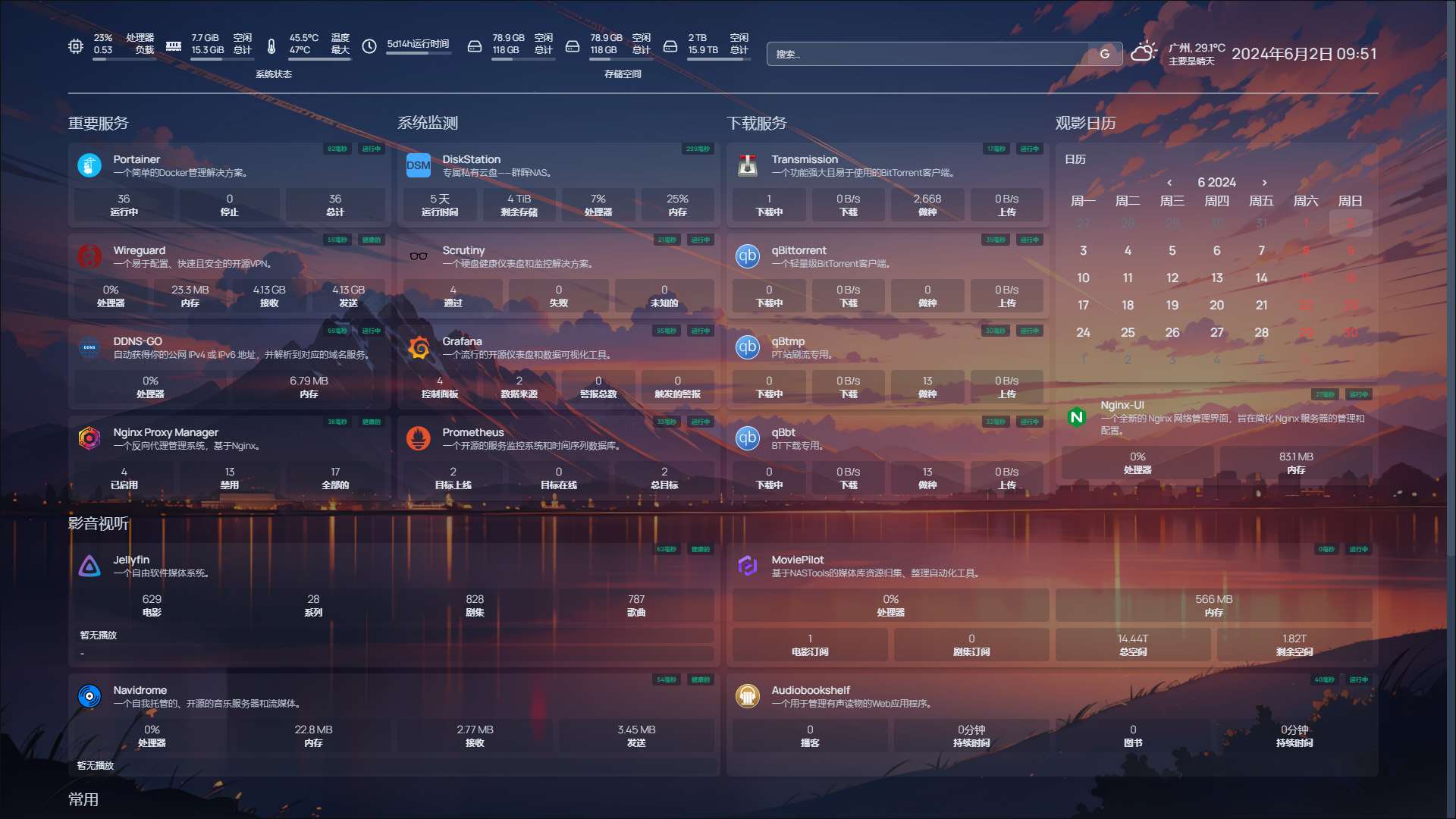
功能亮点:
✅ 响应式设计,自适应各种屏幕
✅ 实时系统监控(CPU、内存、磁盘、温度)
✅ 天气、时间等动态小组件
✅ Docker 容器实时状态显示
✅ 快速服务访问和健康检查
✅ 自定义布局和样式
✅ 完全开源,支持自部署